For a few weeks, while my family was out of town, I “borrowed” a 17″ LCD monitor from them. I felt much more productive. There have been studies that have quantified gains in productivity for users with larger or multiple monitors.
After the LCD I was borrowing was reclaimed, I could feel my productivity dropping. I was spending more time using Exposé to find windows, and I was spending more time scrolling.
Behold the solution:
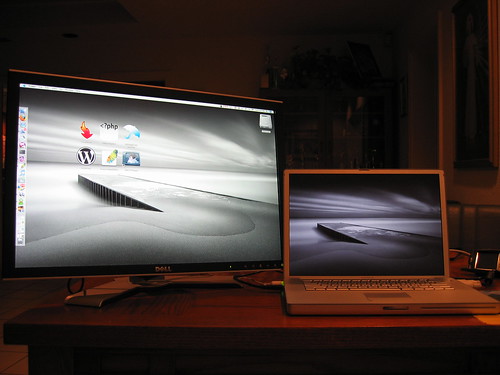
This baby is amazing. Retina-burningly bright. Flawless image (no dead/stuck pixels… yay!) It has a plethora of inputs: DVI, VGA, Component, Composite, S-Video, USB. It has 4 USB ports (acting as a USB hub). It has CF/SM/SD/MS/MMC slots on the side. It can do picture in picture. Better-than-HDTV resolution (1920×1200). I can display 627 image thumbnails at a time in iPhoto. The display rotates 90 degrees, which is great for viewing an entire website, or for viewing PHP code.
I only wish my PowerBook could power another one of these bad boys.
I hate you.
Where’s our screen for OUR personal use….you going to buy me one??
I’ve been using dual monitors for about 5 years. It’s an amazing improvement over a single monitor when you’re using graphics software. I wouldn’t trade my two 19″ monitor system for any single monitor I could afford.
i have dual monitors…well, one is my PB and the other is a Fuji (which isn’t that great). however, i will speak to the productivity issue. i find it much easier to distract myself from work when i can watch two YouTube videos at once while sitting (way) back in my desk chair! glad you got a nice one. rock on, my WP friend.
I agree about the productivity. I’ve got dual 17’s and it helps to keep toolbar clutter down while overlapping windows helps me watch what I need to.
And of course being able to watch a film in one – or play MAME – while working is a bonus 🙂
Can’t wait for my third screen to arrive !
Sweet! Lucky you!
how to put dock to 2nd monitor?
Baldo,
In the Display Preference screen, you click the “Arrangement” tab. You can drag the white menu bar from one screen to the next. The Dock follows the menu bar.
See here.
omg.. i didn’t know that!
this is great!!
I’m gonna write a post about that!
That is one sexy looking screen!
I’ve got me one of those puppies.
Makes designing so much more enjoyable.
I’m jealous…nice setup