I knew it was coming… but still, it’s incredibly exciting now that someone has done it. They’ve combined the photo-sharing goodness of Flickr with the mapping goodness of Google Maps. The result is Geobloggers.
Basically, you can “tag” your Flickr photos with the latitude and longitude where the photo was taken, and the photo will be displayed as a push pin on a Flickr/Google Maps combo. The icing on the cake is the awesome Greasemonkey script(s) that make it really simple to add these latitude and longitude tags to your photos. How easy? Watch.
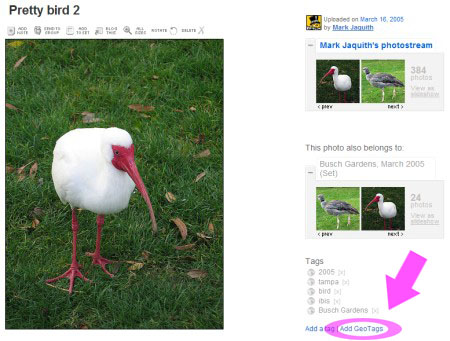
Go to the Flickr photo, and click the 'add Geo Tags' link
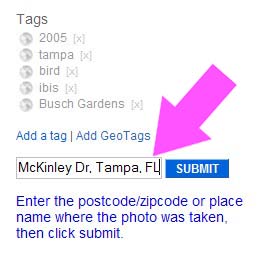
Enter a zip code or an approximate address. This photo was taken at Busch Gardens, FL, so I entered in the nearest intersection, Busch and McKinley
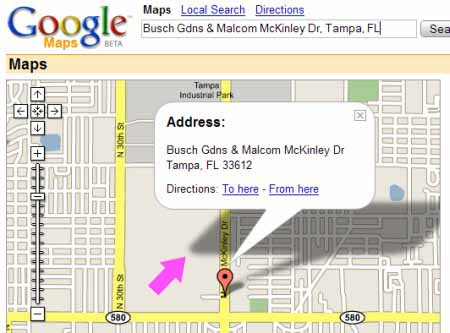
This got me close, but I wanted to show where I was in the park when I took the photo. Doubleclick to recenter and set a more accurate position. Use zoom to be more accurate.
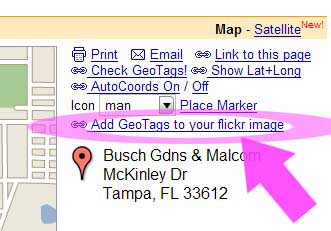
On the right, click the 'Add GeoTags to your Flickr image' link
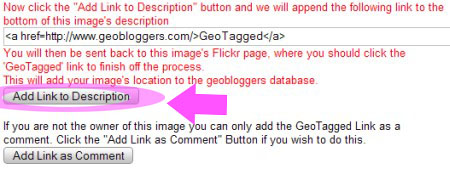
Click 'Add Link to Description.' If this isn't your photo, and you are allowed to add tags, you could click the second button.
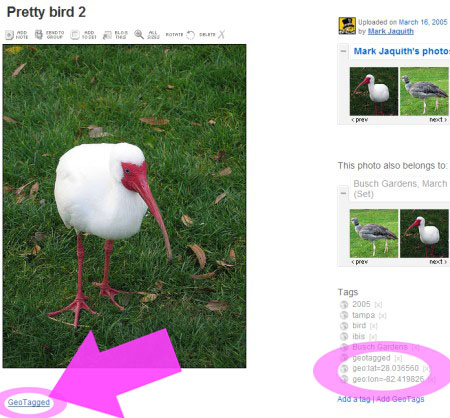
Notice that the geo tags have been added on the right. All you have to do now is click the 'GeoTagged' link in the description.
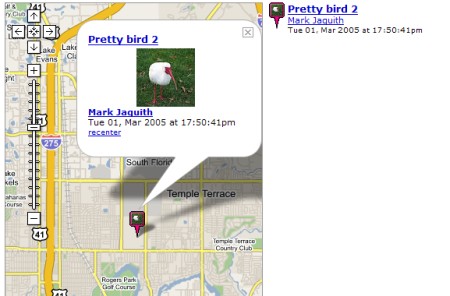
The image is now added to the Geobloggers database!
The whole process takes 10 to 15 seconds. I can’t wait to see what cool uses people find for this. This is practically begging for someone to use it to document a nationwide road trip.
Very nice tutorial, Cheers! 😀
Steeev
Cool idea. I’d never seen Flickr before…
Nice tut up there.
Google Maps doesn’t work in India I think, so sadly this as of today isn’t any use to me 🙁
hey dude, where did the visual walkthrough you made go? it was really cool 🙁
Steeev,
Argh! Looks like I broke my images display script inadvertently. I’ll look into it… thanks for the heads up.
Fixed, Steev. Thanks again.
Consultants like us are watching this trend very closely. It seems to us that the next big thing might very well be “photos.” Almost anyone can take them and they are easy to take now that we have cell phone cameras. Plus, photos tell you much more than a long article. Writing content is only for those that have the talent for it but since a lot more people can take photos, it will bring new people to the world of content. I am excited.
hi. nice idea.the easiest way is to put the gps data of each picture into the picture directly.. so google maps will map it automatically..
we made a little app for this.
http://www.grazer.de
I guess if it really makes a value to tag images to geo coordinates 🙂 … or no?
Google Maps Explorer
Google Maps Explorer
Flickr + Google Map is also available on http://www.globefeed.com/maps.asp
nice plug in
cool
hi 2 all.
hello world! It is nice site. Keep working!
best regards
i found you here http://google.com ^^
Hello admin, nice site! Good luck! Oh yes, one extra comment – make sure the pages are not too long, keep scrolling a minimum.
u guys, just use Google Picasa Web, it’s sooo much easier just upload and drag it onto the map where u want it
%
moviepost.cok
Imagine czk4490 loop. Froogle has an abcbab455d items checker.
Informative post this, thanks for that! I’ll be tagging my Flickr photos as well. You might want to install a spam filter in your blogging software though lol.
See also http://www.mypicsmap.com, a smart way to browse flickr photos (including yours) on a fullscreen google map.